Low-Code vs No-Code App Development: Which Is Best for Your Business?
A simple guide to compare low-code, no-code, and custom app development for your business needs.


Building a mobile app once required a big budget, a long timeline, and a dedicated development team. Today, businesses need apps faster because customers want quick digital access to products, services, and support.
This is why low-code app development and no-code app development are becoming popular. These methods help companies build simple apps, test ideas, and create workflows with less manual coding.
Every business has different app needs. A small business may need a booking app, while an enterprise may need a secure app connected with multiple systems. This blog explains the difference between low-code and no-code app development and helps you know when to choose professional mobile app development services from a trusted mobile app development company.
Understanding Low-Code and No-Code App Development
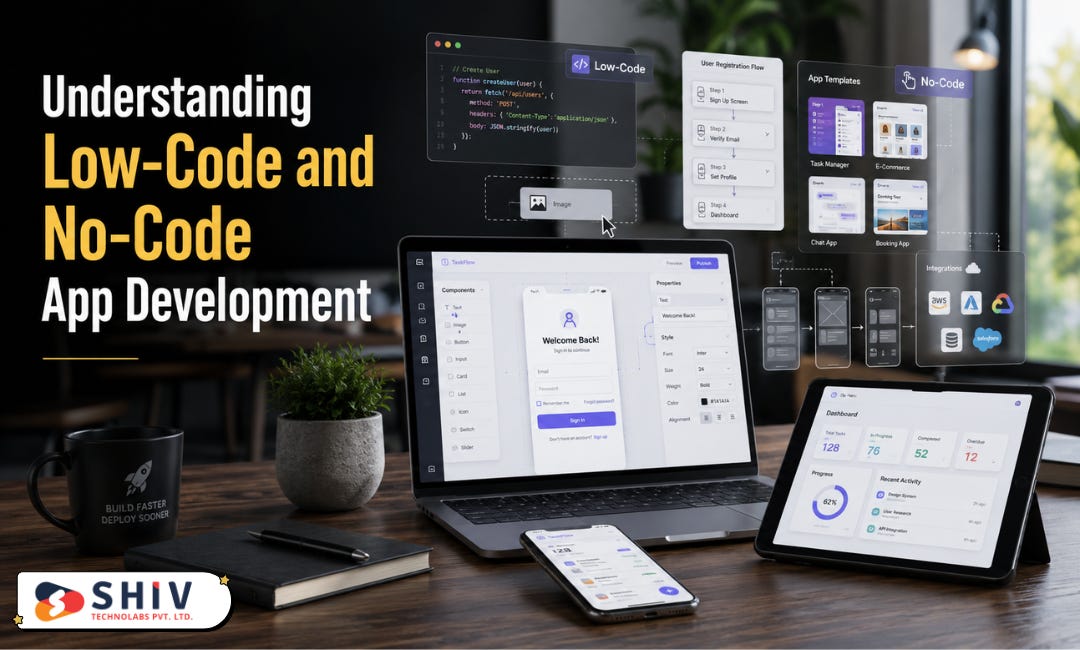
Low-code and no-code app development help businesses build apps faster with visual tools, templates, and ready-made components. Both methods reduce manual coding, but they work best for different needs.
Low-code app development uses visual tools with limited coding. Developers can add custom logic, connect APIs, manage databases, and create business-specific features. It works well for MVPs, dashboards, internal tools, and workflow apps that need more control.
No-code app development allows users to create simple apps without writing code. It is useful for non-technical users, small businesses, and teams that want to test ideas quickly. Businesses can build form apps, booking apps, customer portals, and basic internal tools with fewer resources.
In simple terms, low-code is better when an app needs some customization and technical support. No-code is better when a business needs a simple app or prototype in less time.
Related Article: How to Start a Gaming Business in 2025 – Platforms, Apps, and Costs
Low-Code vs No-Code App Development: Key Differences
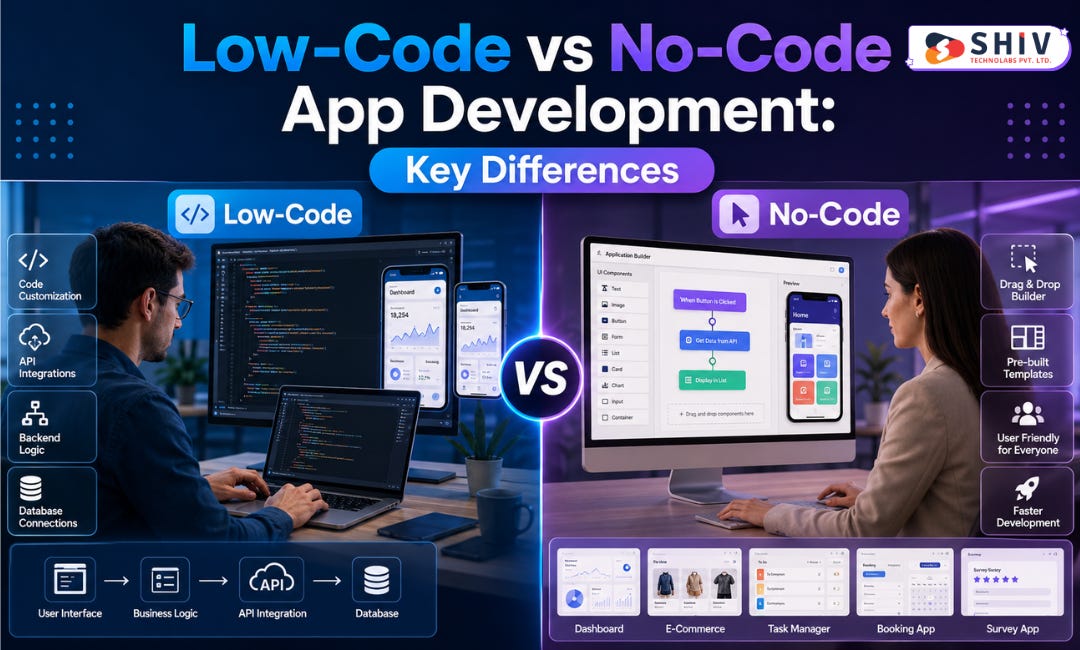
Low-code and no-code app development both help businesses build apps with less manual coding. Still, they serve different needs based on app complexity, user skills, and future goals.
Low-code app development needs some coding knowledge. It gives developers more control over features, logic, integrations, and custom workflows.
No-code app development does not need coding skills. It works best for simple apps, prototypes, and internal tools that need quick creation.
Here is a simple comparison:
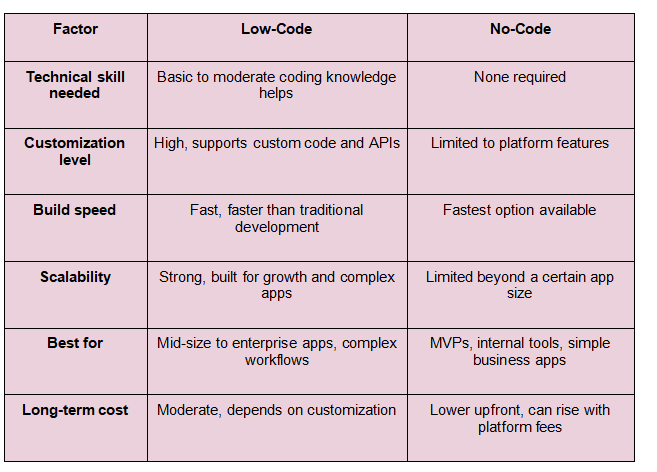
A business handling sensitive customer data, multiple user roles, or third-party integrations will likely outgrow no-code tools faster than expected. A business testing a simple idea or running an internal process tool may never need to move past no-code at all.
Cost and Timeline Comparison: Low-Code vs No-Code App Development
Cost and timeline go hand in hand when comparing these two approaches, and the gap between them has narrowed slightly as platforms have matured. Current pricing and speed depend on app complexity, number of users, integrations, and whether a development partner is involved for setup and customization.
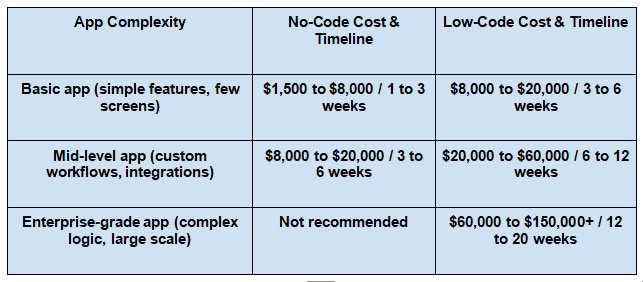
Full custom development takes the longest at every stage, running 8 to 12 weeks for basic apps and stretching to 20 to 40 weeks for enterprise apps. Low-code projects often cost more upfront when a development partner is involved, but this saves money later since the architecture gets built the first time correctly.
Organizations using low-code platforms report average annual savings of around $187,000 compared to traditional development.
Read More: How a Mobile App Development Company Helps Build Scalable Apps
Benefits of Low-Code and No-Code App Development
Low-code and no-code app development help businesses build apps in less time with fewer resources. These platforms are useful for startups, small businesses, and teams that want to test ideas quickly. They also help companies create simple internal tools without starting a large development project.
Faster App Creation
Low-code and no-code platforms help teams create apps faster than traditional methods. Businesses can use ready screens, visual workflows, and built-in components to create a working app. This is helpful for startups that want to test ideas quickly. It also helps companies build simple tools for daily business tasks.
Lower Initial Cost
Low-code and no-code app development can reduce the starting cost of simple app projects. Businesses may not need a full development team for every small idea. This works well for MVPs, prototypes, and internal tools. Later, the business can choose custom mobile app development services when the app needs more features.
Easy Idea Testing
Low-code and no-code platforms help businesses test app ideas with real users. Teams can create a basic version and collect feedback before building a full app. This helps business owners understand user needs. It also reduces the risk of spending money on features that users may not need.
Better Support for Internal Tools
Many companies need apps for tasks, approvals, leads, support tickets, or employee requests. Low-code and no-code platforms can help build these tools quickly. These apps often need simple forms, workflows, alerts, and data views. For such needs, low-code or no-code can be a practical choice.
Choose the Right App Development Approach With Shiv Technolabs
Shiv Technolabs is a trusted mobile app development company that helps startups, small businesses, and enterprises build apps for different business needs. Our team supports clients from app planning to development, testing, launch, and support.
We offer custom mobile app development services, low-code app development support, cross-platform app development, Android app development, iOS app development, and enterprise mobile app solutions.
If you need the right app development path for your business, contact us today. Our team will help you plan and build the right mobile app for your goals.
Conclusion
Low-code app development and no-code app development help businesses build apps faster. No-code works well for simple apps, prototypes, and internal tools. Low-code is better for apps that need custom logic and technical support.
For apps that need strong security, better performance, custom integrations, and long-term growth, custom mobile app development services are the better choice. A trusted mobile app development company can help you choose the right path based on your business goals.
FAQs
1. What is the difference between low-code and no-code app development?
Low-code app development combines visual tools with some manual coding for custom logic, while no-code app development uses only visual tools with zero coding involved. Low-code offers more flexibility for complex apps, while no-code works best for simple, fast builds without a technical team.
2. Is no-code good enough for a business app or only for prototypes?
No-code works well for business apps with straightforward features like bookings, simple e-commerce, or internal tools. It becomes limiting once an app needs complex logic, heavy integrations, or handling for a large number of users, which is when most businesses move to low-code or custom development.
3. Can a no-code app scale as a business grows?
No-code apps can handle moderate growth, but most platforms have limits on performance, customization, and integration depth. Businesses expecting fast growth or complex feature requests usually need to move to low-code or custom development to avoid hitting a platform ceiling.
4. Which is better for a startup: low-code, no-code, or custom development?
Startups testing an idea with limited funding often start with no-code for speed and low cost. Startups with funding and a clearer product roadmap tend to benefit more from low-code, since it supports growth without the long timeline of full custom development.
5. Do low-code and no-code apps work for both Android and iOS?
Most low-code and no-code platforms support cross-platform development, meaning the same app build can run on both Android and iOS. This works well for most business apps, though highly performance-heavy apps may still benefit from native development on each platform.